![[XenGenTr] Prefix system](/data/resource_icons/0/98.jpg?1731824304)
- เวอร์ชัน XF ที่เข้ากันได้
- 2.1
- 2.2
- ข้อกำหนดเพิ่มเติม
- xf 2.3 : https://www.icafezone.net/resources/xengentr-prefix-design-system.108/
[XenGenTr] Prefix system
The plugin is a completely free plugin designed for xenforo 2.2 and above.
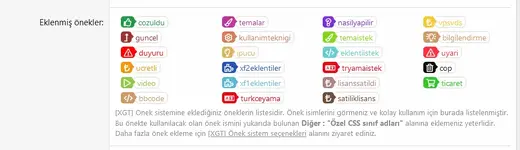
With this plugin, the xenforo structure allows you to use 5 different prefix designs integrated into the plugin by going beyond the prefix designs.

![Screenshot_2021-03-07 [XGT] Prefix system options XenForo 2 Test forum - Admin control p...png](https://www.icafezone.net/attachments/screenshot_2021-03-07-xgt-%C3%96nek-sistem-se%C3%A7enekleri-xenforo-2-test-forumu-y%C3%B6netici-kontrol-webp.16210/ "Screenshot_2021-03-07 [XGT] Prefix system options XenForo 2 Test forum - Admin control p...png")
Plugin installation;
Detailed explanation ( For all plugins ) : Usage technique - XenForo 2 How to install and manual plugin from the archive, how to update?
Manual installation;
Step 1,
- Pull the attached file
Step 2,
- Throw what is in the folder named UPLOAD that appears in the file into the FTP folders with the same name
Step 3,
- Find plugin in Adminpc >> Add-ons >> Install with the Install button
Step 1 Add the prefix design;
- Adminpc >> Installations >> XF options >> [XGT] Prefix system options

Step 2 Add prefix
Adminpc >> Forums >> Topic prefixes >> Add Prefix


The plugin is a completely free plugin designed for xenforo 2.2 and above.
With this plugin, the xenforo structure allows you to use 5 different prefix designs integrated into the plugin by going beyond the prefix designs.
Plugin installation;
Detailed explanation ( For all plugins ) : Usage technique - XenForo 2 How to install and manual plugin from the archive, how to update?
Manual installation;
Step 1,
- Pull the attached file
Step 2,
- Throw what is in the folder named UPLOAD that appears in the file into the FTP folders with the same name
Step 3,
- Find plugin in Adminpc >> Add-ons >> Install with the Install button
Step 1 Add the prefix design;
- Adminpc >> Installations >> XF options >> [XGT] Prefix system options
Step 2 Add prefix
Adminpc >> Forums >> Topic prefixes >> Add Prefix
![[XenGenTr] User banner system](/data/resource_icons/0/97.jpg?1731824304)
![[XenGenTr] Forum statistics 📊 system V4 full english](/data/resource_icons/0/100.jpg?1726469921)